Spreadsheet Ranger
-
Posts
1,979 -
Joined
-
Last visited
-
Days Won
32
Content Type
Profiles
Forums
Events
Articles
Everything posted by Spreadsheet Ranger
-
 Bump - just to get this thread to the top of the list again in case people miss it.
 -
5 things you have on your desk right now
Spreadsheet Ranger replied to Platinum Wealth's topic in General Chat
1. Server Cabinet with Ubiquiti Unifi Switches inside. 2. Samsung Phone 3. Wireless Charger 4. Wireless Keyboard and Mouse 5. Moerse monitor -
Jip, selling my TAS shares now, will buy 50% BTC and 50% ETH
-
Go die in a corner phil! Don't even.. Gosh this stock... I am sick and tired of keeping onto it.
-
I don't think so, mainly because not a lot of people understand it yet, well rather South Africa have a lack of insight into the the crypto space, it's very new to people here compared to America and China. Sent from my SM-G920F using Tapatalk
-
When/where can we buy ZARX stocks? What are the costs involved?
-
The computer will give a blue screen with the error message IRQL NOT LESS OR EQUAL In the windows Event Viewer the following error would be logged: The computer has rebooted from a bugcheck. The bugcheck was: 0x000000d1 (0x0000000000000000, 0x0000000000000002, 0x0000000000000008, 0x0000000000000000). There is 4 Parameters to check here: 1 - Memory Referenced 2 - IRQL at time of reference 3 - 0: Read 1: Write 8: Execute 4 - Address that referenced memory If the first parameter has the same value as the fourth parameter, and the third parameter indicates an execute operation, this bug check was likely caused by a driver that was trying to execute code when the code itself was paged out. In other words, the IRQL error is a memory related error. This error has been known to occur as a result of one of the following causes: Cause 1: Corrupt system files The most common cause for this error is a corrupted system file that is required to boot the system. This can happen because of virus attacks, power outages, or disk write errors. Cause 2: Incompatible device drivers Another common cause is a newly installed faulty device driver. In that case, reverting to an old version of a driver would be the best solution. Cause 3: Faulty hardware items This error can also be caused by a damaged motherboard or a bad RAM module. Cause 4: Incorrect software installation Sometimes, this error may be caused by a misconfigured Windows service. Cause 5: A downgraded Windows installation The least common cause for this error is when an older version of Windows is installed on top of a newer one. Sometimes, the system files are not replaced properly, and if that is the case, then the user should back up the files and perform a clean install to make sure there are no conflicts between different versions of Windows. Possible Fix: Disable memory cache To disable the memory cache of your Windows system, you need to enter in your computer’s BIOS/UEFI menu. Follow these steps for Windows 8/8.1 systems so you can open the UEFI menu: Start your Windows Press Windows key and the C key to open the Charm Bar Click Settings Go to Change PC Settings Select General Click Advanced Startup Click Restart Now Go to Troubleshoot Select Advanced Options Click UEFI Firmware Settings Select Restart Once you’ve entered the BIOS/UEFI menu of your system, follow these steps: Go to the Advanced Menu. Depending on your BIOS/UEFI version, this menu may have a different name. Find the Cache Memory option Hit Enter Select Disabled Press F10 to Save & Exit your changes Restart your computer A general fix for this error to remove all the GPUs and then boot into windows one by one testing until you find the card that trigger the IRQL NOT LESS OR EQUAL error.
-
I'd buy the crypto straight, stock will be such an issue by then.
-
Buy and hold. That is what I do with crypto.
-
Windows 10 update mirror setup
Spreadsheet Ranger replied to Spreadsheet Ranger's topic in General Chat
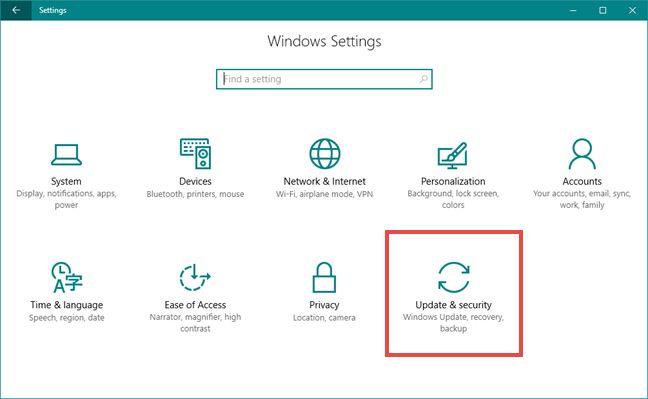
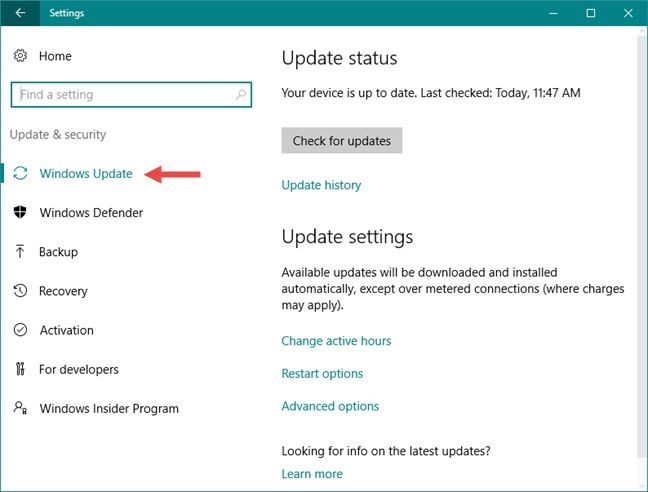
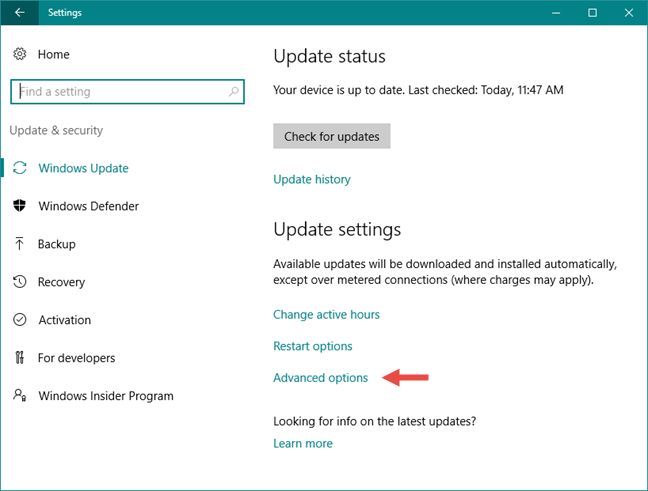
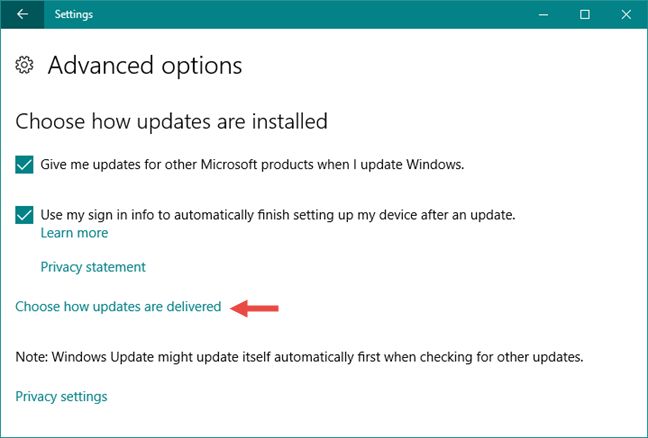
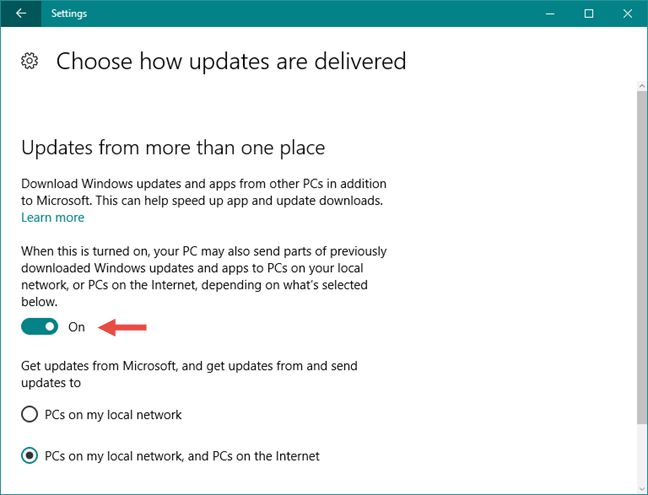
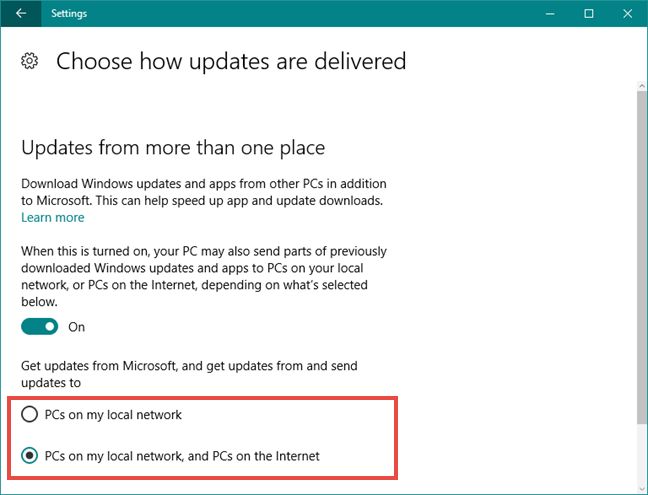
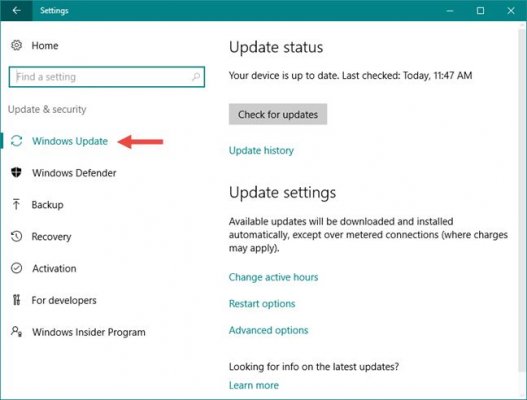
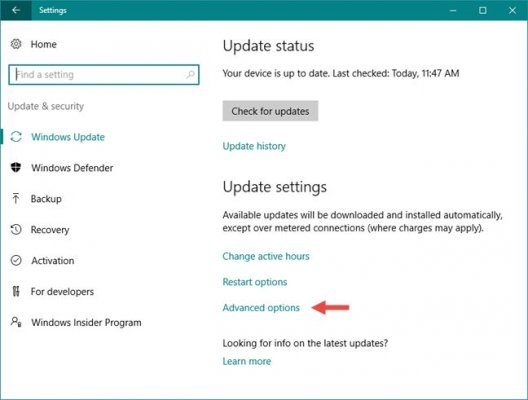
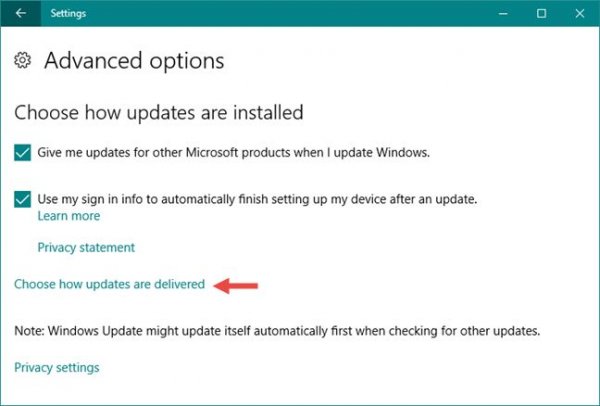
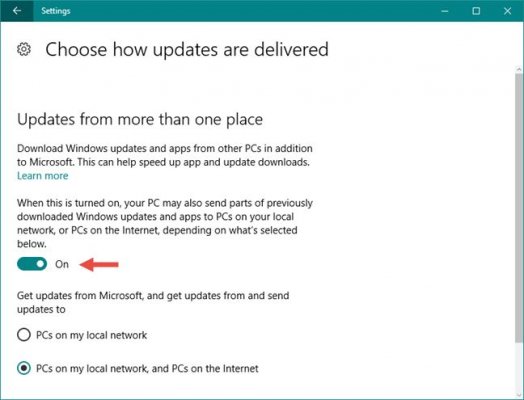
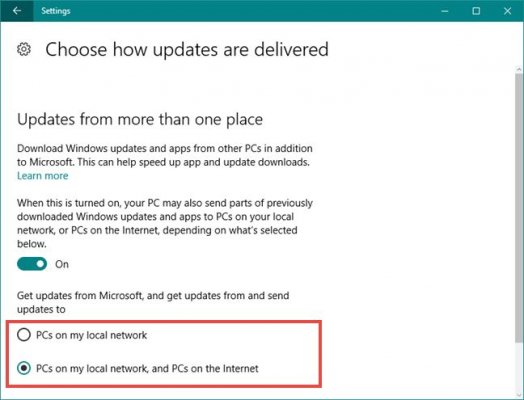
I played with this over the weekend, first prize would have been the ability to use the Windows Server Update Services (WSUS) like Hamster pointed out. Unfortunately, WSUS requires a Windows Server installation to run and that is slightly out of scope for what I had planned here. I know about the settings in Windows 10 to that enables Windows to update over LAN, but from past experience I could never get that to work perfectly. I tried it again this time, decided to make a mini tutorial for others on how to set windows to update over the Lan. Traditionally, the updates for any Windows device were delivered directly from Microsoft's Windows Update servers. While this is the most secure way of getting untampered files, it's not the fastest delivery method that you can use. Windows 10 computers and devices can connect to each other and get updates not only from Microsoft’s dedicated servers, but also from other Windows 10 devices that have already downloaded parts of the updates (In theory). Step 1, Navigate to windows update, press Windows + I on your keyboard. In the Settings app, click or tap on Update & security. The first section is Windows Update and it should be opened automatically. If it’s not, click or tap on it. On the right pane of the Windows Update section, click or tap on Advanced options. The Advanced options window lets you configure everything there is to configure about how Windows Update works. At the end of the main section of settings, which is called “Choose how updates are installed”, you will find a link that lets you “Choose how updates are delivered”. Click or tap on it. Now we've reached a place called “Updates from more than one place”. As you will see, the first thing on this page is a switch that lets you select whether you want to “Download Windows updates and apps from other PCs in addition to Microsoft. This can help speed up app and update downloads”. Enable this option. Now that the switch is on Windows 10 will get updates not only from Microsoft's servers, but also from other sources, like other Windows 10 PCs from your network or even other Windows 10 PCs worldwide, using peer-to-peer connections on the internet. By default, Windows 10 enables downloads of updates only from other PCs from your local network. However, if you want to get updates also from other Windows 10 computers on the internet, select “PCs on my local network, and PCs on the Internet”. (In my case I want it to only be from PCs on the local office network and not the internet.) I believe, since this uses a P2P scheme (similar to torrents) it takes some time for the systems to identify other PCs sharing the update files. If you download all the updates on one machine, then in a short period of time initiate the updates on the others, then they haven't had time to identify that the first machine is sharing the files. You may have to kind of let the update process happen naturally and not manually update the computers.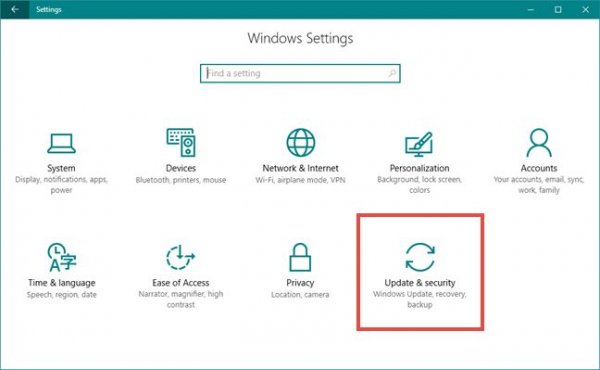
-
Windows 10 update mirror setup
Spreadsheet Ranger replied to Spreadsheet Ranger's topic in General Chat
It's the license costs associated with MS server that I am concerned about. -
Windows 10 update mirror setup
Spreadsheet Ranger replied to Spreadsheet Ranger's topic in General Chat
Dammit. Was hoping there is a way to avoid having to setup a dedicated server. -
Hello, I need some help. I have a small office with 20 machines and 1 main machine, nothing special they all run the same version of windows 10. 20 employees and 1 manager (hence the "main machine"), there is no difference between the installations. I want to use the main machine to be a mirror for the updates. In other words I would prefer if the 20 machines downloads the update from machine one instead of going to the internet. So the scenario must be: The main machine updates and then the other 20 machines downloads that same file over the local lan instead. The reason for this is because this office runs on LTE and data is a bit expensive at the moment and the updates are the only large usage that takes place unnecessarily on all machines.
-
Add us to that list sir, price and bank details Sent from my SM-G920F using Tapatalk
-
@BitcoinZAR did a post a while back about them, perhaps when he reads this he can give us an update of hardware wallets that are both BTC and ETH compatible. Then we do a bulk buy as I am also interested in one and I have 3 other guys as well.
-
My thought as well, these leaks are just confirming what everyone already knows. What is needed is law to be applied and so far it doesn't seem there is any illegal activity, because why are they still free.
-
Oh wow, I did not realize they are the only Lithium exposure we have! Why do I not have this in my portfolio.
-
Graphics cards designed for cryptocurrency mining coming soon
Spreadsheet Ranger replied to Purply's topic in Mining
Now I wonder would that be a new 1060 or will they merely OC the memory of the current 1060 range and add a markup? -
I believe so, I do believe Ether will surpass bitcoin so this current price is a steal in the greater scheme of things. ^My opinion.
-
I bought some dbxUS Now please AXL let today be the day
-
Do you guys have electricity in that part of the world? Probably using the whole neighborhood's supply.
-
Dis mos altyd lekker -_- feeling annoyed.

-
It will *correct again. Btc doesn't crash.
-
Was about to post the same! TWK Investments Ltd (TWK) will be ZAR X’s third listing since the exchange commenced trading in February 2017 and will be one of the pillars of the exchange’s planned agricultural index. “TWK is the first of a series of listings we will be announcing in the next several weeks,” says ZAR X co-founder and CEO, Etienne Nel. “The other listings will cover a range of different industry sectors, but TWK is significant for us in that it joins Senwes and SenwesBel, our first issuers, in demonstrating the value of agriculture as an asset class. https://www.fanews.co.za/article/company-news-results/1/general/1056/zar-x-lists-twk-investments/22322
-
I want to write them a strongly worded E-mail and then deliver it in person.